Account-level default pixel settings
Pixel settings are normally chosen campaign by campaign, in the Monitoring & consent portlet of the campaign page. If you make the same choice on every send, you may as well set it once: the account carries its own default values, applied whenever a new email campaign is created.
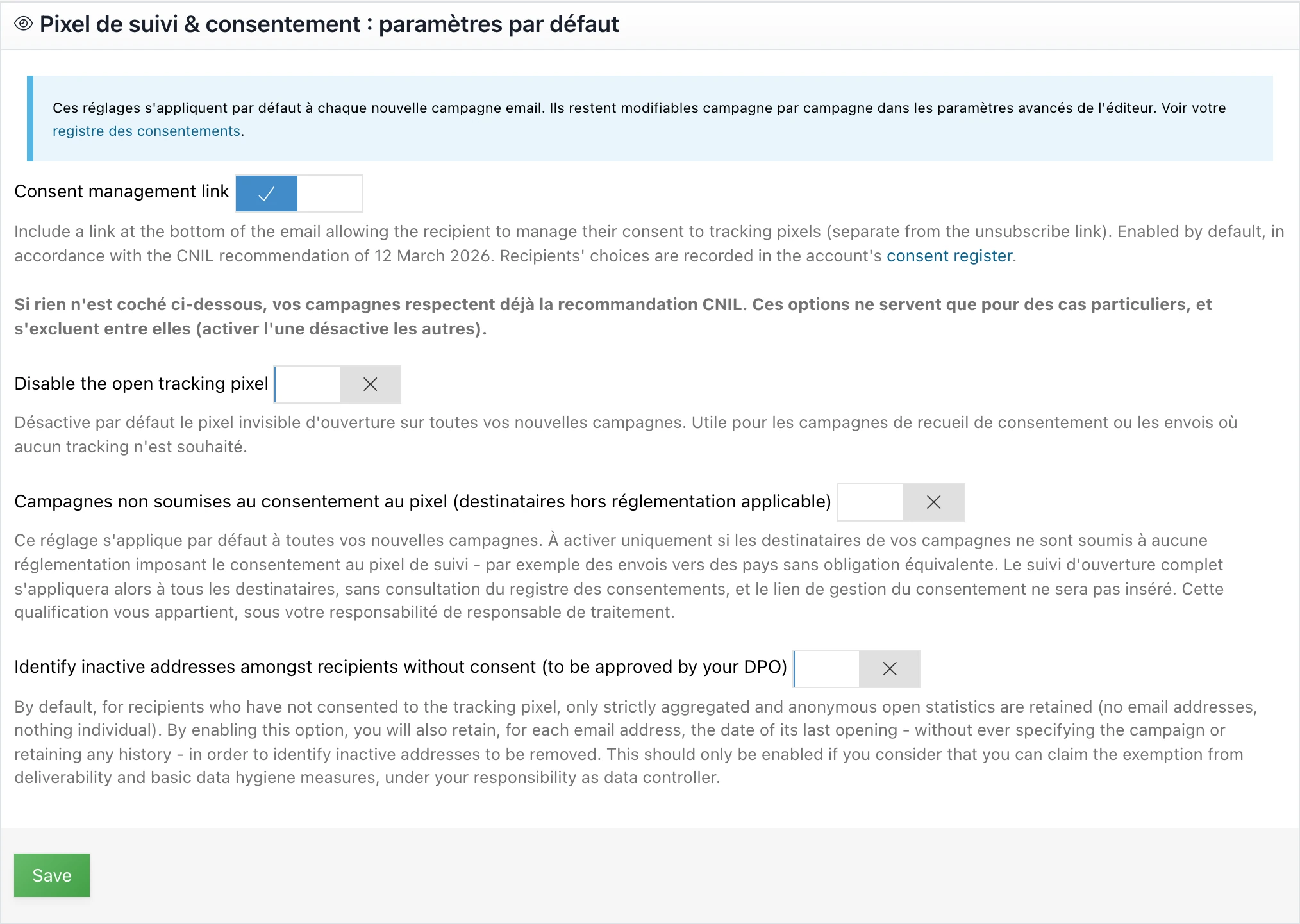
Access: Account management menu → Settings → Tracking pixel & consent: default settings portlet.
What these settings change, and what they leave alone
They pre-fill the Monitoring & consent portlet of campaigns created after you save. Nothing more.
- Each campaign can still be changed individually, in the advanced settings of the editor.
- Campaigns that already exist keep their setting, drafts included.
- Sent campaigns stay locked, as before.
- No status in the consent register is modified. The register and these defaults are two separate things.
The four available settings
| Setting | Original value | Effect on new campaigns |
|---|---|---|
| Consent management link | Enabled | Adds the link at the bottom of the email that lets recipients manage their consent to the pixel, separate from the unsubscribe link |
| Disable the open tracking pixel | Disabled | No pixel inserted, so no open measurement at all, not even aggregated |
| Campaigns not subject to pixel consent | Disabled | Full open measurement for every recipient, except a refusal or withdrawal already recorded at sending time, and no consent management link |
| Identify inactive addresses amongst recipients without consent | Disabled | Keeps, for non-consenting recipients, only the date of the last open per address |
The last three options are mutually exclusive: enabling one disables the other two. Same rule as in the campaign portlet.
If none of these three options is enabled, your campaigns are created in the configuration that complies with the CNIL recommendation of 12 March 2026: automatic branching based on the register, aggregated anonymous counting for non-consenting recipients, and a withdrawal link in the email footer.
The consent management link
This is the only setting enabled out of the box, in accordance with §5 of the recommendation. The choices your recipients make from this link feed the account’s consent register directly.
Disabling it at account level removes that link from all your future campaigns. Keep this for accounts whose sends are entirely outside the consent regime, otherwise you deprive your recipients of the withdrawal mechanism the recommendation requires.
The three options reserved for special cases
Each one, its legal consequences and its typical use cases are described in action 2 of the compliance guide. What changes here is only the scope: the choice applies to all your future campaigns instead of a single one.
When these defaults save you time
Strictly transactional account. Order confirmations, notifications, password resets: if open measurement is of no use to you, enable the pixel disabling once and forget about it.
Account whose recipients are all out of scope. Sends to countries without an equivalent obligation, across the whole account. Declaring out of scope by default avoids repeating it on every campaign. Document the qualification, it is yours to make.
Account relying on the hygiene exemption. If you have had the deliverability and basic hygiene exemption (§3.2) validated by your DPO for all your lists, the default hygiene setting saves you from enabling it campaign after campaign.
Since 14 July 2026, new campaigns are created under the consent regime. An account that was covered by the transitional period, and whose campaigns were created out of scope, therefore finds here the means to restore that behaviour, provided its situation still justifies it.
Going further
References such as §3.2 point to the sections of the CNIL recommendation of 12 March 2026 on tracking pixels (in French).