Filter automated clicks and opens (robots)
What is it for?
Email security solutions (antivirus, antispam, firewalls) use robots that automatically click on the links in your emails to verify they don’t lead to malicious sites. Likewise, Apple Mail Privacy Protection preloads email images, triggering the tracking pixel without the recipient actually opening the message.
These automated interactions artificially inflate your open and click statistics, distorting your view of the real engagement of your contacts.
The filtering offered by Ediware excludes these non-human interactions from your statistics so you get reliable metrics back.
To learn more about this phenomenon, read our detailed article: Click bots and false opens: the plague that distorts your email marketing statistics
How does the filtering work?
The Ediware filtering system combines two mechanisms:
- Time-based filtering: clicks and opens recorded within 6 seconds of the message being received are automatically excluded (a human cannot react that fast).
- Identification-based filtering: interactions coming from known robot IP addresses and hostnames are excluded from the statistics.
Processing delay
Security robots can interact with your emails for several hours after the sending. For this reason, filtering is performed every hour during the first 24 hours following a campaign send.
Your statistics are therefore refined progressively over the first day.
How to enable filtering?
Filtering is optional and is enabled per campaign.
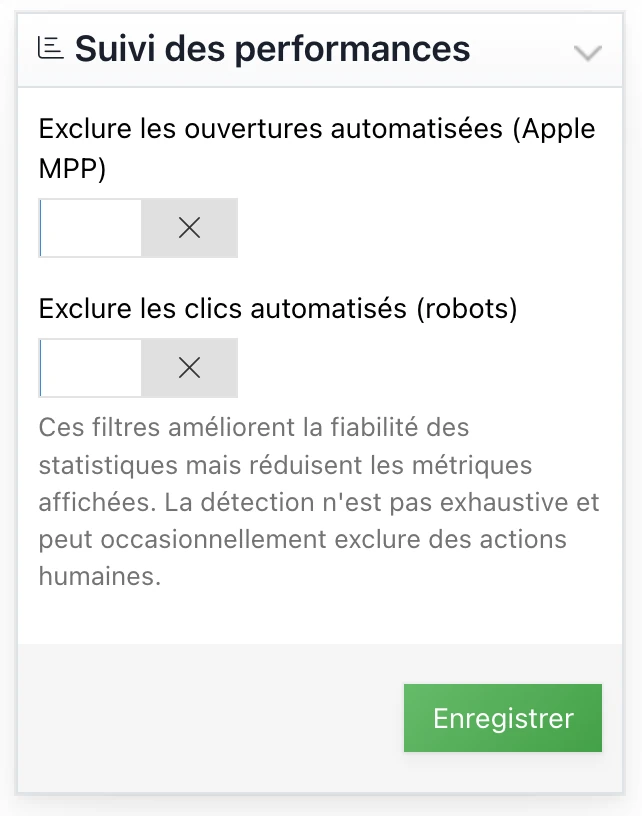
- Go to the details of your campaign
- In the right panel, open the section Performance tracking (there is up to a one-hour wait after the campaign is sent before it becomes available)
- Enable the options you want: - Exclude automated opens (Apple MPP) - Exclude automated clicks (robots)
- Click on Save
How to know if filtering is active on a campaign?
When filtering is enabled, the campaign statistics page displays the following message at the top of the page:
« Some automated actions have been excluded from the statistics. »
Frequently asked questions
My statistics dropped after enabling filtering, is this normal?
Yes, that’s the expected behavior. Filtering excludes automated interactions that were artificially inflating your statistics.
Your new rates reflect the real engagement of your recipients. Note that filtered statistics are no longer comparable to the statistics of your previous unfiltered campaigns, nor to those of other email marketing platforms that don’t necessarily filter robots.
Can I enable filtering after a campaign has been sent?
Yes, you can enable or disable filtering at any time. The statistics will be recalculated accordingly.
Does filtering remove data?
No, raw data is preserved. Filtering simply excludes some interactions from the display of statistics. You can disable filtering to get the full statistics back.
Is filtering 100% reliable?
No filtering system is perfect. Some very sophisticated robots can go unnoticed, and conversely some legitimate interactions could be filtered by mistake. However, filtering significantly improves the reliability of your statistics, especially in B2B.
Should I enable filtering on all my campaigns?
We particularly recommend it for B2B campaigns, where the impact of robots on statistics is greater due to smaller volumes. For high-volume B2C campaigns, the relative impact of robots is generally smaller.